Webhook delivery
Manage connections under Connections > Webhook delivery. A delivery is transport configuration, not a provider identity or permission grant. Standalone and Overwolf use the same provider logic. Only live Overwolf game events require Overwolf.
The creation/edit dialog changes its setup steps, URL examples and field hints when you change Delivery type. Examples are placeholders, not working endpoints; replace them with URLs from your own tunnel or relay. Changing the type clears the previous type’s endpoint fields to avoid mixing incompatible settings.
All screenshots below use synthetic names and placeholder URLs. No accounts, credentials or live channels are shown. Creating a delivery does not create a public endpoint: obtain that endpoint from a tunnel service or relay first.
Default: the webhook gateway
Kick accounts use the operator-managed webhook gateway by default. The gateway receives and verifies Kick webhooks and forwards them to the app, so Kick sources on a gateway account need no delivery here. Their Webhook delivery field shows Webhook gateway (default).
Use the deliveries on this page only when you choose an alternative: switch the Kick account’s Connection to Self-hosted Kick companion under Connections > Accounts, then pick a Cloudflare/ngrok HTTP tunnel, a Raw-body relay or, for unverified generic events, Smee.
Where is the Kick companion?
It is the Node.js script apps\kick-companion\kick-companion.cjs in the
Stream Pulse repository, not a
separate Kick product or an automatically started part of the app.
The current build has no companion installer/executable.
For HTTP tunnel and Raw-body relay Kick delivery, install Node.js 22.12 or newer, obtain/extract the repository, and open PowerShell in its root folder. Set your Kick application credentials and public HTTPS URLs, then run:
pnpm kick:companion # or: node .\apps\kick-companion\kick-companion.cjs
Read Get and run the Kick companion
for the complete download steps, secret prompt, copyable PowerShell
configuration, expected startup output and local status check. Keep its
terminal open while using Kick, alongside your separate tunnel process.
The companion normally listens at http://127.0.0.1:5180; that local address is
the Companion origin, not a public webhook URL.
The generic Smee source does not require the companion.
Choose an endpoint service
| Resource | Use in Stream Pulse | What you need to supply |
|---|---|---|
| Cloudflare Tunnel | HTTP tunnel | A tunnel running on the companion machine, a public hostname, and route restrictions. A named tunnel is preferable for a stable OAuth/webhook URL. |
| Cloudflare Quick Tunnels | Temporary HTTP tunnel experiments | A temporary hostname and a path-restricted origin/proxy. Hostnames change on restart; there is no uptime guarantee. Quick Tunnels do not support SSE, so do not use them to host the Raw relay stream URL. |
| ngrok quickstart and webhook guide | HTTP tunnel | An installed/configured agent, your assigned HTTPS endpoint, and an edge policy or local proxy allowing only /webhook and /callback. Follow current account and plan requirements. |
| smee.io | Smee, unverified only | Create a channel and copy its full URL. No local companion or separate Smee CLI is needed for this source. |
| Your own compatible HTTPS/SSE service | Raw-body relay | An incoming webhook URL and an outgoing stream URL implementing the protocol below. Stream Pulse does not currently provide a hosted compatible relay or recommend a verified public relay provider. |
Tunnels and relays are different. A tunnel forwards original requests to your local companion; a raw relay queues original bytes for the companion to read. An arbitrary webhook inspection URL, standard Smee channel, or JSON-rewriting forwarder is not a compatible verified raw relay.
Keep the companion and tunnel/relay processes running. Do not put an interactive
login challenge in front of /webhook: Kick cannot complete it. Leave provider
signature checks enabled, and never publish the simulator or companion control
APIs. Tunnel and relay operators may see payloads; inspect their privacy and
retention policies before sending private events.
HTTP tunnels
Create an HTTP tunnel delivery with:
- The local Companion origin, normally
http://127.0.0.1:5180. - The Public webhook URL registered in the provider’s application settings.
For example, if your tunnel hostname is your-tunnel.example, enter
https://your-tunnel.example/webhook as Public webhook URL and route that
path to http://127.0.0.1:5180/webhook. The companion origin remains
http://127.0.0.1:5180, not the public tunnel hostname. The OAuth redirect would
be https://your-tunnel.example/callback, not the webhook URL.
Run a tunnel such as Cloudflare Tunnel or ngrok yourself. Forward only
/webhook and the separate OAuth /callback route to the companion.
Do not expose /local/*, /desktop/*, or the simulator server. The companion
rejects forwarded control requests as an additional protection.
Test endpoints registers the delivery with the companion and checks that its public endpoints answer:
- HTTP tunnel: the companion sends a one-time probe to the public webhook
URL and confirms it arrives back at the same companion. It also reports when
the URL does not match the companion’s
KICK_WEBHOOK_URL. - Raw relay: the companion waits for the relay stream to connect and checks that the public webhook URL answers.
- Smee: the app opens the channel’s event stream once.
A passing test does not prove that the provider’s app configuration matches. Send a synthetic test through your provider only when you are ready.
For Kick, set KICK_WEBHOOK_URL to this public webhook URL (it defaults to
KICK_PUBLIC_URL plus /webhook), register that exact URL in Kick, and select
the delivery in the Kick source. The account and delivery must use the same
companion. Existing Kick sources without an explicit delivery retain the
legacy companion tunnel setup.
Example: fill in the HTTP tunnel delivery
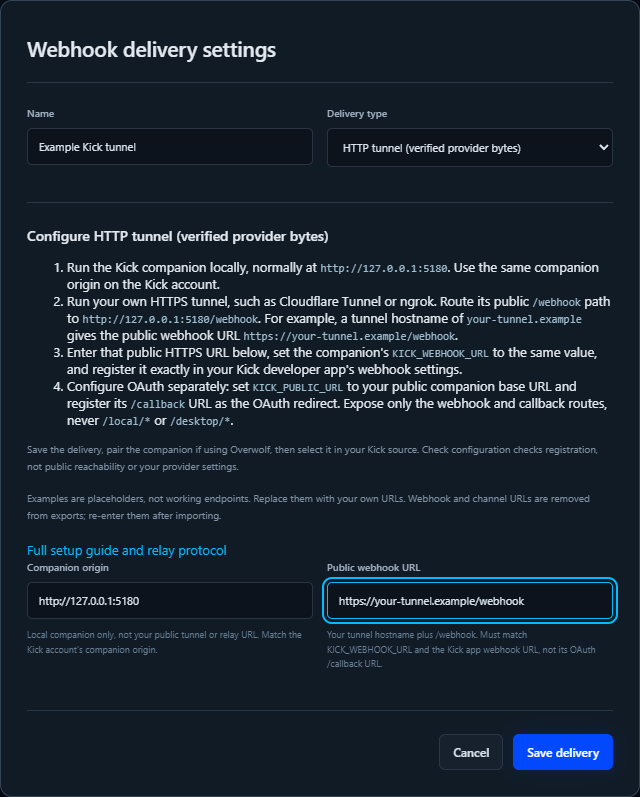
| Setting | Example |
|---|---|
| Name | Example Kick tunnel |
| Delivery type | HTTP tunnel |
| Companion origin | http://127.0.0.1:5180 |
| Public webhook URL | https://your-tunnel.example/webhook |
Companion KICK_PUBLIC_URL |
https://your-tunnel.example |
Companion KICK_WEBHOOK_URL |
https://your-tunnel.example/webhook |
| Kick app webhook URL | https://your-tunnel.example/webhook |
| Kick app OAuth redirect URL | https://your-tunnel.example/callback |
Replace your-tunnel.example with the hostname your tunnel actually supplies.
The first four rows are delivery fields; the environment variables and Kick app
settings are configured separately, not by saving this form.
Example: restrict a named Cloudflare Tunnel
Follow Cloudflare’s locally managed tunnel setup
to install cloudflared, create/authenticate the tunnel, and route a hostname
you control to it. Use its actual tunnel ID, credential-file path and hostname
in a local configuration such as:
tunnel: YOUR_TUNNEL_ID
credentials-file: 'C:\Users\YOUR_USER\.cloudflared\YOUR_TUNNEL_ID.json'

ingress:
  - hostname: your-tunnel.example
    path: '^/(webhook|callback)$'
    service: http://127.0.0.1:5180
  - service: http_status:404
The anchored path rule forwards only the two public routes, preserving their
paths. Everything else returns 404 at the tunnel, including /local/* and
/desktop/*. Keep the credentials file private and out of source control.
See Cloudflare’s configuration reference
for ingress matching and validation.
For a configuration saved at $HOME\.cloudflared\config.yml, run in PowerShell:
cloudflared tunnel --config "$HOME\.cloudflared\config.yml" ingress validate
cloudflared tunnel --config "$HOME\.cloudflared\config.yml" run YOUR_TUNNEL_ID
In another terminal, with your Kick client ID and secret already configured as described in Kick companion:
$env:KICK_PUBLIC_URL = 'https://your-tunnel.example'
$env:KICK_WEBHOOK_URL = 'https://your-tunnel.example/webhook'
node .\apps\kick-companion\kick-companion.cjs
For ngrok, follow its setup links above and apply equivalent path restrictions
using Traffic Policy
and the Deny action,
or a path-restricted local reverse proxy. Do not simply publish the whole
companion port. Use the resulting ngrok HTTPS hostname in place of
your-tunnel.example in all matching settings.
Finish and verify
- Register the exact webhook and redirect URLs in your Kick developer app.
- Save this delivery. In Overwolf, pair the companion as described below.
- Sign in through Connections > Accounts and select this delivery in the Kick source. The account must use the same local companion origin.
- Select Test endpoints. It should report that the public webhook URL reaches this companion.
- Keep Stream Pulse in Dry run in standalone and send a provider test event, when available. Check the source status, event matching and Activity. A plain unsigned POST must not be accepted as a verified Kick event.
If the tunnel hostname changes, update the environment variables, Kick app
webhook/redirect URLs and delivery URL together, then restart the companion.
Do not treat OAuth callback errors as webhook errors: /callback and
/webhook are separate routes with separate purposes.
Pair Overwolf with the companion
Overwolf’s file-origin requests cannot use the browser-only /local/* API.
Instead:
- Start the companion locally. Copy its short-lived pairing code from the console, or use Generate code for Overwolf in the trusted standalone browser page.
- In Overwolf, open the Kick account’s sign-in settings or a delivery’s Pair companion section.
- Paste the code into Single-use pairing code and select Pair this app.
- Sign in to Kick, refresh saved accounts, configure sources and destinations.
Pairing grants app-level access to companion accounts and actions. Pair only your trusted local app. Codes expire after five minutes, are single-use, and failed attempts are rate limited. Pairing credentials survive app restarts in a separate local store and are never exported with configuration.
Revoke this app’s pairing revokes its credential. In the trusted browser, List paired apps lets you revoke individual desktop clients. Revocation also terminates their open event streams. A freshly installed/imported Overwolf app must pair again; account metadata is not authorization.
Browser control routes retain exact-origin checks. Desktop routes require a
bearer credential for every operation: Origin: null by itself grants nothing.
Raw-body outbound relays
Use Raw-body relay when a compatible relay service receives HTTPS webhooks and exposes an outbound SSE stream. The companion opens the stream, so no public webhook listener on your computer is needed. A separately reachable OAuth callback is still required for Kick sign-in.
Enter the provider-facing Public webhook URL and the Raw relay stream URL. These URLs usually differ. Stream Pulse supplies the consumer adapter; it does not deploy or operate a relay service.
For example, Public webhook URL might be
https://relay.example/hooks/your-channel, while Raw relay stream URL is
https://relay.example/streams/your-channel. Use the real incoming-webhook
and outgoing-SSE URLs supplied by your relay operator; these example paths are
not a requirement. Register the incoming URL with Kick and set
KICK_WEBHOOK_URL to that exact value. Keep the companion origin local.
Example: fill in the raw-body relay delivery
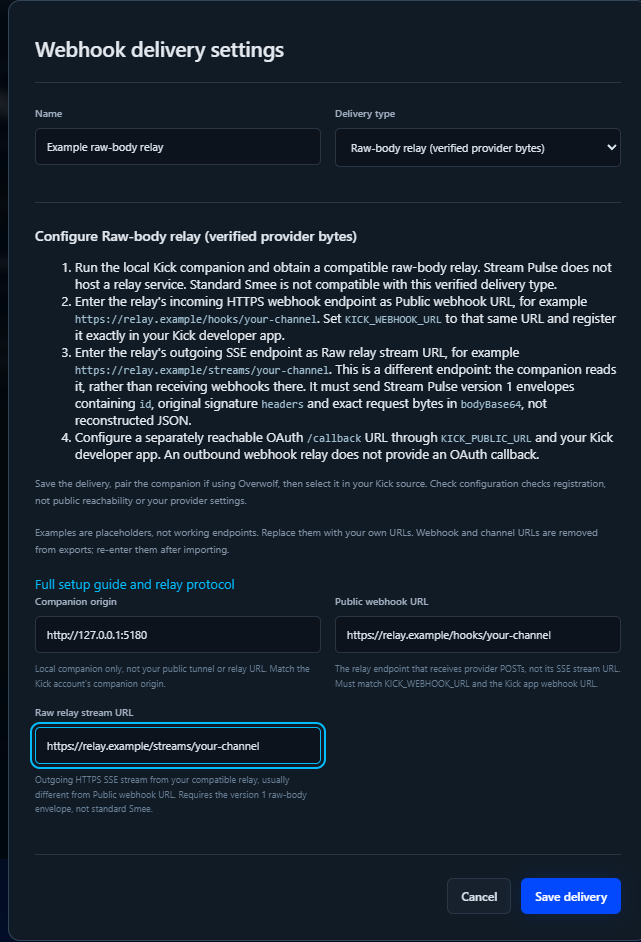
| Setting | Example |
|---|---|
| Name | Example raw-body relay |
| Delivery type | Raw-body relay |
| Companion origin | http://127.0.0.1:5180 |
| Public webhook URL | https://relay.example/hooks/your-channel |
| Raw relay stream URL | https://relay.example/streams/your-channel |
Companion KICK_WEBHOOK_URL and Kick app webhook URL |
https://relay.example/hooks/your-channel |
Companion KICK_PUBLIC_URL |
https://your-callback-tunnel.example |
| Kick app OAuth redirect URL | https://your-callback-tunnel.example/callback |
These are illustrative relay paths, not a deployed service. Obtain both relay
URLs from your own compatible implementation or operator. The stream URL must
return Content-Type: text/event-stream; it is not the URL to which Kick
POSTs. If a service only supplies a webhook inbox or parsed JSON stream, it
does not meet this contract.
Configure the companion, for example:
$env:KICK_PUBLIC_URL = 'https://your-callback-tunnel.example'
$env:KICK_WEBHOOK_URL = 'https://relay.example/hooks/your-channel'
node .\apps\kick-companion\kick-companion.cjs
Keep the callback tunnel path-restricted as above (only /callback is needed
when the relay handles webhooks), configure Kick client credentials separately,
and register the exact redirect and webhook URLs in the Kick app.
Save the delivery, pair if using Overwolf, and select it in the Kick source.
Check the delivery status for stream connection errors. A connected SSE stream
does not prove that provider signatures, subscriptions or OAuth are configured.
Required relay message format
The relay must preserve the original bytes. Each default SSE message’s data
contains one JSON object:
{
  "version": 1,
  "id": "unique-delivery-id",
  "headers": {
    "kick-event-message-id": "original-message-id",
    "kick-event-subscription-id": "original-subscription-id",
    "kick-event-message-timestamp": "original-timestamp",
    "kick-event-signature": "original-base64-signature",
    "kick-event-type": "chat.message.sent",
    "kick-event-version": "1"
  },
  "bodyBase64": "base64-of-original-request-bytes"
}
Send heartbeats while idle. The adapter limits frame/body sizes, reconnects with backoff and cancels streams when delivery configuration is removed. Only original Kick event/signature headers are accepted by the current provider adapter. Decoded bytes pass through the same signature, timestamp, replay and subscription checks as direct webhooks. Relay IDs never substitute for provider verification.
The shared transport is intended for future GitHub HMAC verification too; GitHub-specific accounts and event adapters are not implemented yet.
The JSON above is the content of an SSE data: message, terminated by a blank
line. Its descriptive signature/body placeholders are not valid signed events.
Preserve the provider’s actual headers and raw request bytes; do not generate
bodyBase64 by parsing and reserializing JSON. For SSE framing/background, see
MDN: Using server-sent events.
Smee: unverified generic events
- Obtain a channel at smee.io or a compatible server.
- Create a Smee delivery with its HTTPS channel URL.
- Add a Smee (unverified webhooks) source and choose that delivery.
For example, Smee channel URL looks like
https://smee.io/your-channel-id. Copy the actual channel URL from Smee and
use that same URL for your webhook sender. Unlike the other delivery types,
Smee has no companion origin or separate public-webhook/stream URL fields.
Example: fill in the Smee delivery
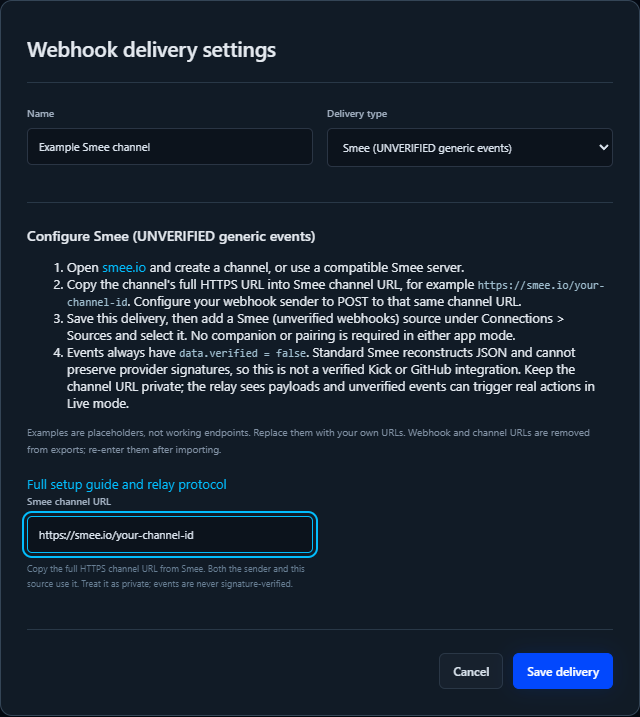
| Setting | Example |
|---|---|
| Name | Example Smee channel |
| Delivery type | Smee (UNVERIFIED generic events) |
| Smee channel URL | https://smee.io/your-channel-id |
| Sender’s webhook URL | The same actual Smee channel URL |
| Source type | Smee (unverified webhooks) |
| Source delivery | Select Example Smee channel |
Select Start a new channel on smee.io, copy the resulting URL, and replace the example above. Save the delivery, create/select the Smee source, and keep standalone in Dry run. There is no companion sign-in, OAuth redirect or pairing step for this generic source.
After you have enabled the source, send a synthetic example from PowerShell:
$channel = 'https://smee.io/REPLACE_WITH_YOUR_ACTUAL_CHANNEL_ID'
Invoke-WebRequest -Method Post -Uri $channel `
  -ContentType 'application/json' `
  -Headers @{ 'X-GitHub-Event' = 'issues' } `
  -Body '{"action":"opened","issue":{"title":"Synthetic webhook example"}}'
This sends public, synthetic test data to a third-party relay, not to GitHub or Kick. It deliberately demonstrates why the header does not authenticate the sender. Do not paste credentials, private payloads or real account data into the example.
Match a rule against game Smee (unverified webhooks), feature unverified
and event issues. Expect data.body.action to be opened and
data.verified to be false. Unmatched source events are counted but do not
produce a rule run in Activity. Use a matching dry-run rule to inspect the
example without sending destination actions.
The source connects directly by SSE in either app mode. No companion is
required for this generic source. Events use game source:smee, feature
unverified, and event name x-github-event, kick-event-type, or webhook.
The original parsed JSON body appears in data.body; data.verified is
always false. Match nested payloads with conditions/templates, for example
``.
Standard Smee parses and reconstructs JSON. Provider signatures cover the original bytes, so it cannot be selected as verified Kick delivery. Never disable provider verification to work around this limitation.
Smee events can trigger real actions in Live mode, but are not authenticated provider events. Use only a trusted channel, suitable rules and cooldowns. The relay operator receives webhook content, and anyone with the channel URL may be able to listen. Do not send secrets or real private webhook data in tests.
Storage and portability
Delivery names, IDs and companion origins are exported. Public webhook and relay/channel URLs are stored locally but removed from exports because their paths can contain secrets. Re-enter these URLs after importing configuration. Pairing credentials, OAuth secrets and refresh tokens are never configuration fields.
Internal design decisions are kept in the repository’s docs/plans/ folder
and are not published on this site.